Incident Response Theory: Ep.1 – Introduction
Quick Summary
When computer security policies or practices are violated, organizations need to know what to do. In this lab, you’ll learn what incident response is and how to plan to deal with incidents when they occur.
What is an incident?
An incident is a violation (or threat of violation) of your computer security policies or standard security practices. Some common examples include distributed denial of service (DDOS) attacks against web servers or malware executed by a user.
Incidents are a subset of events defined as any observable occurrence in a system or network. System-monitoring software or staff can flag an event by creating an alert. This draws attention to a particular event, such as notifying the SOC team of a suspicious email. Following validation, an alert can be considered an indicator of an incident, which will see an organization invoke its incident response policies.
Types of CIRTS
An organization’s cyber incident response team (CIRT) handles incidents. This multi-talented group is responsible for responding to security breaches, viruses, and other potentially catastrophic security incidents. In addition to technical specialists capable of dealing with specific threats, it should include experts who can guide enterprise executives on appropriate communication in the wake of such incidents. The CIRT normally operates in conjunction with other enterprise groups, such as site security, public relations, and disaster-recovery teams.
Some organizations handle (or mishandle) incidents by ignoring them, which can have serious repercussions. A prepared incident response team can handle an incident quickly – even if caught off-guard. Planning for an incident can help the team to identify and recover the system and prevent further damage.
As well as the security benefit, a well-handled incident can give IT personnel a confidence boost, allowing them to identify weaknesses, take precautions (such as updating patches), and sharpen their skills.
There are three types of CIRTS. Organizations may use one or all three:
- Central Incident Response Team – a single team that handles incidents within an organization
- Distributed Incident Response Team – multiple teams that handle specific logical or practical segments of an organization
- Coordinating Team – a team that manages other CIRTs, whether individually, centrally, or distributed
Roles within an incident response team
Incident response teams are typically built in a hierarchal structure. Senior and executive management supervise the incident manager, who is responsible for overseeing an incident’s technical management and business management.
The business management side of an incident can include media handling by PR, HR, customer services, and the legal department, whereas a technical or recovery manager would oversee the technical management. The technical team is split between investigators, analysts, cybersecurity SMEs, IT, and infrastructure.
From a security standpoint, the following technical roles may be included:
- SOC analysts
- Malware reverse engineers
- Forensics experts
What types of incidents can occur?
- Malicious code – Malware infection on the network, including ransomware
- Denial of service (DOS) attack – A flood of traffic can take down a website (this applies to phone lines, other web-facing systems, and in some cases, internal systems)
- Phishing – Emails attempting to convince someone to trust a link or attachment
- Unauthorized access – An unauthorized person (internal or external) has access to systems, accounts, and data
- Insider threat – Malicious or accidental action by an employee causing a security incident
- Data breach – Lost or stolen devices or hard copy documents, unauthorized access or extraction of data from the network (usually linked with some of the above)
- Targeted attack – An attack specifically targeted at the business, usually by a sophisticated attacker (often encompassing several of the above categories)
How to make an incident response plan
Your cybersecurity incident response plan should be the starting point for the incident handling process. According to the National Cyber Security Centre (NCSC), a basic incident response plan should include:
- Key contacts
- Escalation criteria
- Basic flowchart or process
- At least one conference number
- Basic guidance on legal or regulatory requirements
Cybersecurity authorities have outlined several incident response processes; with the NCSC and the National Institute of Standards and Technology (NIST) offering different approaches. The former advises that an incident response process is made up of the following stages.
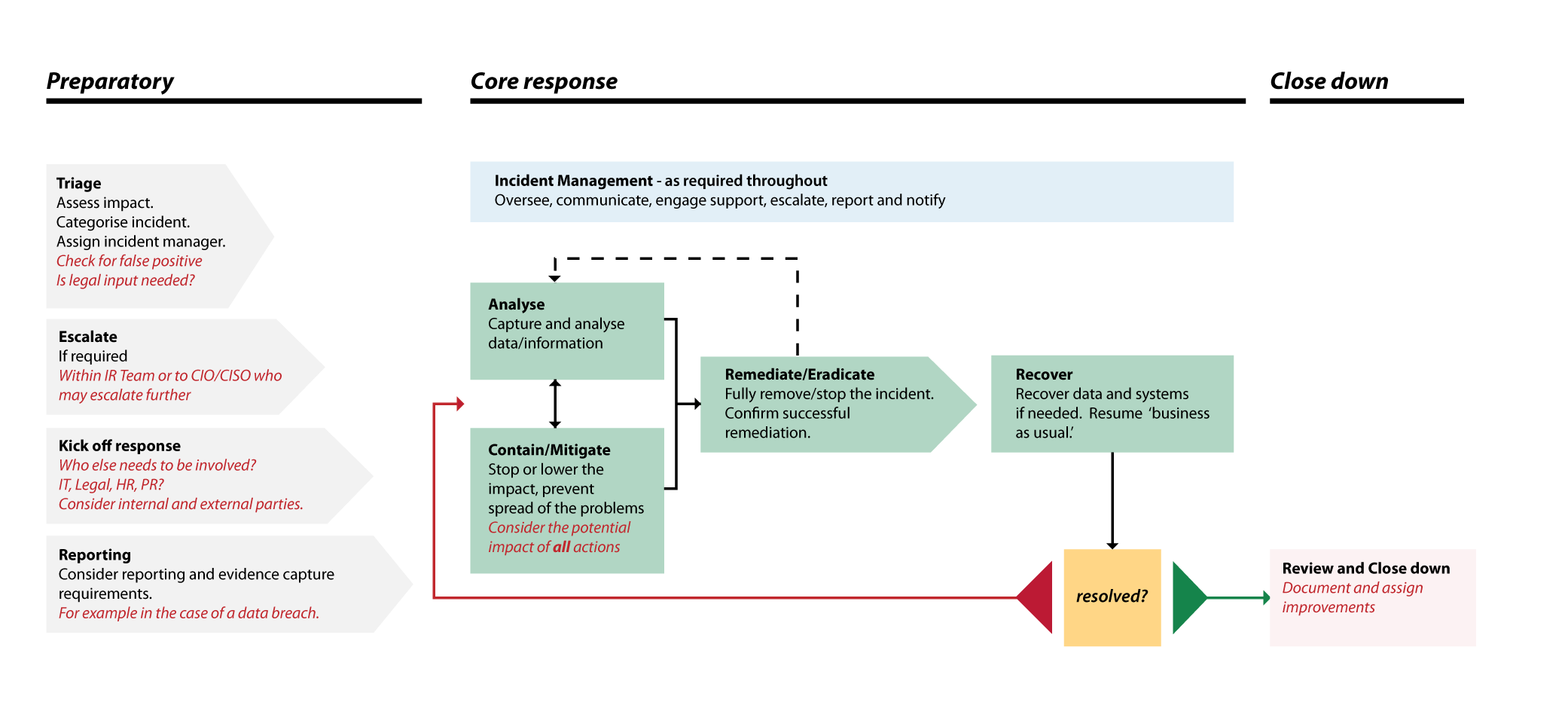
Contrary to the NCSC’s guidance, NIST’s Computer Security Incident Handling Guide, states the incident response process is:
Although slightly different, these processes communicate similar ideas. Essentially, both your incident response plan and your incident response team are critical and must be thorough enough to manage a range of incident types.
Incident Response Theory: Ep.2 – Process
Teams need to be prepared to handle and prevent incidents.
To be prepared to handle an incident, a team must consider how to manage communications (for example, thinking about contact information, reporting mechanisms, or war rooms), software, hardware, and any other available resources such as port lists and network diagrams.
Incident prevention is everyone’s responsibility. It’s always important to ensure applications, systems, and networks are secure. Teams must be conscious of the main recommended practices for securing networks, systems, and applications (for example, malware prevention and user awareness training).
Another part of the preparation phase is to consider the different attack vectors an adversary could use. The team should understand a range of common attack vectors so they can identify attacks through certain types of activity. For example, understanding email services would help to identify phishing attacks.
Detection and analysis
The first step in detecting an incident is recognizing the signs that something’s going on. These signs come in two categories: precursors and indicators.
A precursor is a sign that an incident may occur in the future. For example, web server log entries that show the usage of a vulnerability scanner.
An indicator is a sign that an incident might have already occurred or might still be happening. For example, network intrusion detection sensor alerts when a buffer overflow attempt occurs against a database server.
The sources of these signs will be covered in more depth later in the series – there are plenty. For now, just think of them as coming from attack vectors.
When an incident occurs, the initial analysis has several critical steps that are key to identifying the scope of the incident and determining which systems, networks, and applications have been affected. Considering things like normal behaviors, system and network profiling, and event correlation can make analysis easier. Documentation is equally important – you must be as thorough as possible to prove your response is sufficient. This makes it easier for technical and non-technical staff to understand and helps it stand up in court if necessary.
The team must then assess the situation based on the initial analysis and accurately prioritize the response based on the functional impact, informational impact, and recoverability. The team is also responsible for notifying other parties of the incident, which typically includes the CIO and head of information security. The team must consider possible communication methods to facilitate this.
Containment, eradication, and recovery
Once the team has handled an incident (after being detected, analyzed, documented, prioritized, and communicated to the stakeholders) it must choose a containment plan. This should be unique to the type of incident that’s occurred.
Containment is crucial to prevent further damage and to ensure resources aren’t overwhelmed. Decision-making is key to containment and is made easier by following documented procedures for specific types of incidents. For example, disconnecting the network or shutting down the system. NIST advises that companies define acceptable risks to develop strategies accordingly. Other crucial phases of containment include evidence gathering, handling, and identifying the attacking hosts.
After an incident has been contained, you may need to eradicate malicious files or disable breached accounts. Eradication won’t always be necessary, and might sometimes form part of the recovery process instead.
During recovery, administrators will oversee the restoration of operations, the resumption of normal activity, and confirm everything is functioning adequately. When eradication crosses over with recovery, administrators might mitigate vulnerabilities that have been exploited.
Critically, eradication and recovery should be done in a phased approach that prioritizes remediation steps, so the threat can’t become active again.
Post-incident activity
Once your organization has recovered from an incident, you then need to consider what lessons you’ve learned. Collect the incident data and retain any evidence that has been recorded or documented; you might need it if a court case is opened.
Incident Response EP3 - preperation
Incident Response Theory: Ep.3 – Preparation
Preparation introduction
There are two core elements to the preparation stage: incident preparation and incident prevention.
An incident response (IR) team isn’t specifically responsible for incident prevention, but it can help maintain security measures to stop incidents from happening. So it makes sense to couple prevention with preparation as early as possible in the IR process.
Considering incident response is a cyclical process, preparation and prevention are considered before and after an incident. Before to ensure something doesn’t happen, and after to ensure something doesn’t happen again.
Incident preparation
Communications
To ensure they are sufficiently prepared to respond to an incident, an IR team must establish its communication methods.
You should think about contact information (such as email addresses, phone numbers, on-call information, and public encryption keys), but also security information to help verify identities. This needs to be readily available for team members, law enforcement, and other incident response teams.
It’s also vital to secure incident reporting mechanisms, an issue-tracking system, and smartphones to facilitate out-of-hours offsite and onsite communications.
Encryption software will help secure communications between your organization and external parties, and a war room can establish a base for these comms.
Finally, organizations should use a secure storage facility to ensure any stored evidence is secure.
Hardware and software
Any hardware and software required to analyze an incident should be installed in advance. This may include forensic workstations, backup drives, and disk images to preserve log files and incident data. You should also provide readily available laptops for live analysis and report writing and packet sniffers to track network activity.
Spare hardware is beneficial if the primary hardware has been compromised, mainly to restore operations when time permits. It’s useful to have spares of any hardware, including workstations, laptops, servers, network equipment, and any virtual equivalents.
On the evidence handling side of things, you should keep both used and blank removable storage media. You can store backups of trusted software versions on used storage media, and store evidence ready for further analysis on the blank ones. It’s also recommended to have additional evidence gathering accessories, such as notebooks, digital cameras, audio recorders, chain of custody forms, evidence storage bags and tags, and evidence tape. These are useful for legal purposes in particular if evidence is required in court proceedings.
Analysis resources
In addition to hardware and software, you must prepare other resources ready for incident analysis. These include:
- Port lists detailing commonly used ports and those associated with specific strains of malware
- Documentation for operating systems, applications, and protocols
- Documentation for intrusion detection systems (IDS) antivirus (AV) software
- Network diagrams and lists of critical assets to identify assets at risk
Keep a baseline of activity across all networks, systems, and applications while interpreting incident activity. You can use this to compare with the incident data and check for anomalous behavior. You should also keep hashes of critical files to assess whether they’ve been modified.
Mitigation software
In the context of preparing for incident response, mitigation software refers to having access to clean images of operating systems and applications for restoration purposes. It’s always best practice to keep backups. Keeping these up-to-date images of applications means they can be easily restored.
Incident prevention
Risk assessments
Regular risk assessments are a universal method of incident prevention. A risk matrix can help you visualize and match risks with their priority.
Risk can be mitigated, transferred, or accepted until a reasonable overall level of risk is determined.
Risk is calculated by the threat level multiplied by the vulnerability level multiplied by the information value. Even when both the threat level and vulnerability level are high, if the information value is low, the risk isn’t as great.
As an extra benefit, risk assessments can identify critical assets, allowing staff to prioritize monitoring and response activities for those resources.
Host security
You should continuously monitor the security of all hosts, by enabling auditing and logging all security events.
Approach host security with the principle of least privilege – privileges should be based solely on the host’s authorized tasks, so hosts are given the lowest privileges possible to perform their duties. In practice, this means hosts are denied any activity outside the specific functions they’re authorized to undertake.
Network security
Network security should be approached similarly to host security – where the network perimeter denies all activity that isn’t expressly permitted. For example, VPNs and connections to external organizations.
Malware prevention
Organizations should deploy AV software across all hosts, application servers, and application clients. NIST recommends using software that’s designed to detect and stopmalware, ultimately preventing its spread across a network, instead of the reactive approach of just preventing the initial installment by deploying it at a host level.
For additional security preventing the initial installment, configure a firewall at a network level to block inbound and outbound connections from or to known malicious domains and IP addresses. This will reduce the likelihood of an incident and prevent malware from being installed.
User awareness training
Finally, all users should be made aware of security policies and procedures about the acceptable use of networks, systems, and applications. At the end of the incident response process, the lessons learned should be shared with all users so everyone can recognize how their actions could affect the organization.
Furthermore, all IT staff should be trained to maintain security standards across all networks, systems, and applications.
Incident Response Theory: Ep.4 – Detection and Analysis
Introduction
The second stage of the incident response process is made up of two integral parts: detection and analysis. The former outlines different attack vectors, the signs of an incident, and the sources of precursors to and indicators of an incident. The latter details the general incident and the documentation, prioritization, and notification of an incident.
Attack vectors
Incident response teams must be aware of as many attack vectors as possible to detect and respond to any incident. Only a handful of common attack vectors are listed in the guide, but these aren’t designed to categorize incident types.
- Attrition – uses brute force methods intended to compromise, degrade, or destroy systems, networks, or services.
- Email-based attacks – concern phishing, including spearphishing and whaling, but excluding vishing (voice phishing) which is delivered via phone calls.
- External or removable media – can contain malware in the form of USB flash drives.
- Impersonation – involves replacing something benign with malicious code. Examples include spoofing, man-in-the-middle attacks, rogue wireless access points, and SQL injection.
- Improper use – executed by violating an organization’s acceptable use policy. This could include installing software that leads to losing sensitive data.
- Theft of equipment – including laptops, smartphones, or authentication tokens.
Some of these attack vectors may seem more obvious than others. it’s also important to note that this list isn’t exhaustive – any kind of attack is possible.
Signs of an incident
It’s not unusual to receive thousands or even millions of intrusion detection system (IDS) alerts each day. It takes technical knowledge and experience to analyze and compare true-positives from false-positive results. Two categories distinguish the signs of an incident:
- Precursors – a sign that an incident may occur in the future
- Indicator – a sign that an incident may be presently occurring or may have occurred previously
Precursors may include log entries that reveal a vulnerability scanner, new exploits that target a vulnerability in software used by the organization, or something more obvious, such as a malicious group stating they intend to launch an attack.
An example of an indicator may include an IDS alert after a buffer overflow attack attempt or where antivirus software detects that malware has infected a system. Other indicators could be:
- Seeing a filename with unusual characters
- Auditing configuration changes that are recorded in a host’s log
- Numerous failed logins from an unknown remote system
- Vast quantities of emails containing suspicious content
- An unexpected surge in network activity
Sources of precursors and indicators
Precursors and indicators both have many different sources, depending on where they come from. NIST divides sources into alerts, logs, people-based information, and publicly-available information.
Examples of alert-based sources include:
- IDSs
- SIEMs
- Antivirus and antispam software
- File integrity checking software
- Third-party monitoring services
Examples of log-based sources include:
- OS, service, and application logs
- Network device logs
- Network flows
Examples of people-based sources include:
- People from within the organization
- People from other organizations
A source of publicly available information could be intel on new vulnerabilities and exploits.
Analysis
When precursors or indicators aren’t accurate or available, you must analyze an alert to determine its accuracy and integrity. You might receive millions of wrong alerts every day, making it difficult to identify the valid ones. Further, accurate alerts aren’t always security incidents.
Filtering in this way determines true-positives (a genuine threat) from false-positives (not a threat). A false-negative result occurs when a threat is identified but didn’t trigger an alert. A true-negative result is when no threat is detected, and no alert is triggered. True-negatives are relatively negligible for an analyst, as these are considered ‘normal’ activity, but still exist as a category based on the logic.
Not all incidents are clear, so analysts often need to collaborate when making decisions. Some incidents are relatively easy to detect – such as a defaced website – whereas others may show very few symptoms or are misinterpreted. For example, one simple change in a configuration file may be the only symptom to work from and can easily appear as business as usual. Without well-trained, quick, and capable analysts, costly mistakes could be made. The initial analysis identifies the scope of the incident – which networks, systems, and applications have been affected; the origin; and the tools, methods, or vulnerabilities that were used.
To make an initial analysis easier, NIST recommends:
- Profiling networks and systems
- Understanding normal behaviors
- Creating a log retention policy
- Performing event correlation
- Keeping all host clocks synchronized
- Maintaining and using a knowledge base of information
- Using internet search engines for research
- Running packet sniffers to collect additional data
- Filtering the data
- Seeking assistance from others
Documentation
Documenting an incident is integral to an investigation. Incident response teams should track the status of incidents and other pertinent information by using an issue tracking system. These systems can help manage an incident and ensure quick resolution. It’s important to track the following within these systems:
- Current incident status
- Summary of the incident
- Indicators related to the incident
- Other incidents related to this incident
- Actions that are taken by all incident handlers
- Chain of custody (if applicable)
- Impact assessments related to this incident
- Contact information for other parties
- A list of evidence gathered during the investigation
- Comments from incident handlers
- Next steps to be taken (restoration of operations, patching vulnerabilities)
Prioritization
There are three factors to consider when prioritizing an incident: functional impact, information impact, and recoverability. The first considers how operations are affected. When combined with information impact, this can determine whether an incident will have a long-lasting effect on the organization’s reputation. The third factor determines how well the team responded to an incident. NIST goes into more detail about how these impacts are categorized in the following tables, taken from its Computer Security Incident Handling Guide:
Escalation
Organizations should also establish an escalation process when the team doesn’t respond to an incident within the designated time. This can happen for many reasons, such as telephone failure or personal emergencies.
Notification
After an incident has been analyzed and prioritized, the IR team must notify all appropriate personnel. In terms of reporting, requirements may vary for each organization, but generally, the IR team should notify people such as the CIO, head of information security, system owners, human resources, and public affairs.
Communication methods must be prepared to provide updates on incident status to all parties. The communication could be via email, website (internal, external, or portal), by phone, in person, voicemail, or even physical paper notices.
Incident Response Theory: Ep.5 – Containment, Eradication, and Recovery
Quick Summary
The stages are as follows:
- Preparation
- Detection and analysis
- Containment, eradication, and recovery
- Post-incident activity
This lab will focus on the containment, eradication, and recovery stage.
Introduction
Containment of an incident is the main focus of this stage, and eradication and recovery are briefly covered towards the end. The emphasis is on containment because you don’t want the incident to spread any further. You must strategize to prevent further damage, acknowledge how to gather and handle evidence, and identify the attacking hosts.
Containment strategy
It’s critical you contain the incident as early as possible to prevent further damage and stop resources from being overwhelmed. Decision-making is a key skill when containing an incident – this is made easier if there are predetermined strategies and procedures for the containment phase.
Strategies should be based on incident types; you wouldn’t use the same strategy to contain a DOS attack as you would malware. Below are a few examples of considerations when choosing a strategy:
- Potential damage to and theft of resources
- Need for evidence preservation
- Service availability (e.g., how services provided to clients may be affected)
- Time and resources for strategy implementation
- Strategy effectiveness (e.g., partial containment, full containment)
- Solution duration (e.g., emergency workarounds to be removed within four hours, temporary workarounds to be removed within two weeks, permanent solutions)
You can’t downplay the dangers of delaying the containment strategy. Attackers can use this time to escalate unauthorized privileges or compromise more systems.
Redirecting an attacker to a sandbox environment is the best way to monitor their activity (to gather more evidence) while preventing them from continuing to cause damage. Other methods of monitoring shouldn’t be used post-detection – if an organization allows an attacker to continue compromising its resources, it may be liable if those resources become used to attack other systems.
Additionally, if an incident handler disconnects a compromised host from the network to contain an incident, they shouldn’t assume that no further damage can be caused. A malicious process may detect network disconnection if they periodically send ping requests that begin to fail. This malicious process may overwrite itself or encrypt the hard drive.
Evidence gathering and handling
For evidence to be admissible in court, it’s crucial to document how it was acquired and preserved. All evidence activity should be recorded in a detailed log that includes identifying information, such as the location, hostname, MAC, and IP addresses. This log should also include the names, titles, and contact numbers of each individual who collected or handled the evidence. Timestamps are key to any investigation and should also be logged, particularly when handling evidence. Lastly, the storage location should be logged separately from the location of the identifying information, which refers to where the evidence was collected rather than stored.
Identifying the attacking hosts
Identifying the attacking hosts can be important, but often detracts from the containment, eradication, and recovery of an incident. It’s time consuming and not always possible. A system owner may want to know who caused the incident purely for investigative purposes, but it won’t help achieve the main goal of reducing business impact. The most common activities used to identify an attacker are:
- Validating the attacking host’s IP address
- Researching the attacking host through open-source intelligence and domain intel
- Using incident databases, which contain incident data and information about attacks
- Monitoring possible attacker communication channels
Eradication and recovery
Once contained, eradication is often required to eliminate components of an incident. This could be in the form of deleting malicious files, disabling breached accounts, or mitigating any exploited vulnerabilities. All affected hosts must be identified for remediation. The eradication stage isn’t always necessary, and sometimes forms part of the recovery process.
The purpose of recovery is to restore operations to ‘normal’ and confirm everything is functioning as it should be. Where eradication is part of recovery, vulnerabilities may be patched to avoid similar incidents occurring in the future.
Recovery can involve using clean backups for restoration purposes or completely rebuilding systems. Compromised files may be replaced, passwords should be changed, and general network security is paramount after an incident has occurred. The perimeter should be monitored closely, with additional firewall rules set. Once a resource is attacked successfully, other resources are often similarly attacked.
To ensure remediation is prioritized appropriately, it’s recommended to use a phased approach to eradication and recovery. Sometimes recovery can take months, so high-priority security changes should be implemented as early as possible and large-scale infrastructure changes should come in the later stages of recovery.
It’s sometimes appropriate to implement temporary infrastructure changes that are refined later. Still, an organization should approach the recovery by focusing solely on the critical security issues before concerning themselves with significant infrastructure changes.
ncident Response Theory: Ep.6 – Post-Incident Activity
Quick Summary
This lab covers the final stage of the NIST incident response process: post-incident activity. You’ll learn why this process is cyclical, acknowledging the steps required to prepare for future incidents after recovery.
NIST’s incident response standard
The National Institute of Standards and Technology (NIST) is an authority that dictates US cybersecurity standards. Founded by Congress, its four-stage process is a simple guide for all companies with incident response teams to handle any cybersecurity threat.
The stages are as follows:
- Preparation
- Detection and analysis
- Containment, eradication, and recovery
- Post-incident activity
This lab will focus on the post-incident activity stage.
Introduction
You’ve recovered from the incident, but the process doesn’t stop here. Now you must evaluate how you handled the incident, learn from your lessons, and use the collected incident data to create an evidence retention policy.
Lessons learned
Organizations usually evaluate performance after the completion of a task. However, because the incident response process is cyclical, this part is all about refining how IR teams handle future incidents. NIST’s guidance suggests that the best method to achieve closure on an incident is to hold a meeting that reviews the process in depth. Note that multiple incidents can be reviewed in a single “lessons learned” meeting.
At a high level, the aim is to cover what occurred, what actions were taken to intervene, and how well that intervention worked. As you go deeper, the following questions should be answered:
- What happened and at what times?
- How well did staff and management perform in dealing with the incident? Were the documented procedures followed? Were they adequate?
- What information was needed sooner?
- Were any steps or actions taken that might have inhibited the recovery?
- What would staff and management do differently if a similar incident occurred?
- How could information sharing with other organizations have been improved?
- What corrective actions can prevent similar incidents in the future?
- What precursors or indicators should be watched for in the future to detect similar incidents?
- What additional tools or resources are needed to detect, analyze, and mitigate future incidents?
Minor incidents shouldn’t take too long to evaluate, and the post-incident activity for these sorts of events is generally limited (excluding new, concerning attack methods). There’s much more to consider for large-scale incidents, so logically the post-incident activities can take longer.
Post-mortem meetings should occur after a serious attack for information sharing purposes. These meetings should cross team and organizational boundaries where necessary. People directly involved with the incident response process should attend these meetings, along with anyone who can help cooperate in the future.
These meetings come with their benefits; meeting reports can be used to train new team members on how to (or how not to) respond to incidents. Additionally, they’re also useful when updating incident response policies and procedures. Responders should write a follow-up report to provide a reference for if and when a similar event happens again.
The IR team should document a formal chronology of events for legal purposes. This will help calculate any damages caused by the incident, which may provide a basis for prosecution activity. All follow-up reports should be kept as specified in your record retention policies.
Using collected incident data
After the lessons learned meeting, responders should produce objective and subjective data about the incident(s) that will prove useful in several ways:
- The number of hours involved and cost may justify extra funding for the incident response team
- Incident characteristics might indicate systemic security weaknesses and threats, plus changes in incident trends
- Governance teams can use this to support risk assessments, leading to the implementation of additional controls
Incident response data that’s properly collected and stored can help gauge the success of the IR team. It will help determine if changes to incident response capabilities correspond to the team’s performance changes.
Focus on collecting actionable data as opposed to simply available. Absolute numbers are not informative – what matters is understanding how they represent threats to business processes.
Organizations should determine what incident data to collect based on the reporting requirements and return on investment from the data. Possible metrics include:
- Number of incidents handled
-
- A high or low number of incidents isn’t necessarily good or bad
- Low numbers can indicate the use of good security controls
- High numbers could suggest effective identification of threats
- Subcategories can be used to provide more detail
- A high or low number of incidents isn’t necessarily good or bad
- Time per incident
-
- Labour spent
- Time elapsed between incident detection and analysis and containment, eradication, and recovery
- Time to respond to the initial report
- Time to report the incident to management and, where necessary, external entities
- Labour spent
- Objective assessment of each incident
-
- Review incident documentation
- Precursors and indicators
- Damage caused before detection
- Identifying the cause, attack vector, exploited vulnerabilities, characteristics of victim applications, systems, or networks
- Review incident documentation
- Subjective assessment of each incident
-
- Self, peer, and team assessment of performance during the incident
- Incident response audit
-
- Incident response policies, plans, and procedures
- Tools and resources
- Team model and structure
- Incident handler training and education
- Incident documentation and reports
- The measures of success discussed earlier in this section
- Incident response policies, plans, and procedures
Evidence retention
The organization should establish an evidence retention policy to determine how long the evidence from an incident is held. Most organizations retain this for months or even years. NIST advises considering the following when devising an evidence retention policy:
-
Prosecution – should an attacker be prosecuted, the organization must retain relevant evidence until all legal actions are complete.
-
Data retention – most organizations retain certain types of data for a certain period of time. However, if this data is to be used as evidence, organizations may need to be flexible. The General Records Schedule (GRS) 24 specifies that incident handling records should be kept for three years.
-
Cost – individual pieces of hardware used as evidence may generally be inexpensive. But storing them for an extended period can be costly. Organizations should retain functional computers that can store evidential hardware and media.
wip incident investigation runbook
everyone is welcome to please contribute
this kinda thing is subjective: if you have an alternative/better/different way of doing things please append this to the existing method and “let the people decide” which way they’d like to do things
File Hash Reputation
Very prone to false positives.
Filseclab, Rising and SecureAge Apex are known to alert on common legitimate executables and system processes - look for other vendors to support your decision to send a ticket
Noteworthy Fields:
- file.code_signature.* (is the file signed with valid signature)
- file.pe.* (does the file contain information about version, author, product, etc)
- threat.technique.name
- file.name (file in question)
- process.executable (typically the installer loading the file.name)
If the process.executable is an EDR system (ie Cylance) and the file.name has been appended with something like quarantined (ie mimikatz.exe.quaratined) only escalate if the quarantined file is malware or suspected to be harmful as opposed to something like a setup for an application. Note the quarantine/block in the ticket and modify the priority accordingly
Multiple outbound connections initiated by PowerShell
Please check the destination before ticketing… for example if s-asn.organization-name = Cisco Webex Llc then it’s probably legit and shouldn’t be ticketed unless you see additional IOCs
Please also review the powershell script/s that triggered the incident by turning on the device ip field (provide value) and turning off the incident identifier. This can be done on Explore (Basic Triage or Events) around one/five minute around the incident.
List of suspicious users
-
Who was logged into the machines at the time of compromise/adversary actions?
-
- go to the customers Customer Directory page, and
- from the summary page open the Kibawna ToC.
- From there, I go to Basic Triage (all observations that viewable via Kibawna)
- using a piece of information (artefact(s)) you have from either the original incident/alert, from the customer thereafter, or from your own investigation you can search through for the user information like so:
-
- add the date/timeline
- ad.event.user.username
-
Who failed to login during the scope of the incident?
-
- Enterprise Administrator
- Domain Administrator
- User
- Which user was signing into multiple machines after core business hours?
- Who is supposed to be logging into the machines?
-
- What is normal versus abnormal
- What service accounts are normal and which machines should they be signing into?
- What scripts are running that need specific credentials?
-
List of suspicious domains accessed (C2)
-
- Can be difficult to investigate for critical machines (DC, File Servers, etc) due to noise
- Better to review on workstations that were impacted
-
- Less noise
-
List of suspicious files/file hashes
-
- User/System Temp Folders
- Registry Keys
-
- Run or RunOnce
- Windows home folder
- Desktop
- User/Downloads
-
Any suspicious established outbound connections on critical machines?
-
- Customer must run a NETSTAT -ABNO and identify a suspicious IP and the PID associated to the process which established the connection
-
Any suspicious processes on critical machines?
-
- PSLIST/ Get-Process (PowerShell)
-
- Identify PID from NETSTAT and locate file that executed/started process
-
Any suspicious services started?
-
Any suspicious ScheduledTasks?
Containment
The purpose of this stage is to prevent the adversary from spreading their malware and eliminate network, host and account access for the adversary
- Block Outbound/Inbound Activity on Firewalls (Gateway/Segments)
-
- Very tough decision for most companies
-
- Will lose money and consumer confidence
- Unable to do remote activities
- Needed to stop adversary’s access to customers network
-
- Inbound (Remote Service/Backdoor)
- Outbound (C2)
- Disable NIC on Backup Servers
-
- Speeds up recovery progress
- Backups are one of the best recovery options during ransomware
- Reduce Administrator Accounts (Enterprise, Domain, Administrator)
-
- Critical Need – only those needed for the IR
-
- Roll all passwords (could be compromised also)
- Limits the freedom of maneuver for the adversary
-
- They will have to re-complete some of their offensive stages
- Noise due to scripts
-
- Some of these accounts are required to run scripts/services and disabling them can increase noise in environment
- Customer Lessons Learned
-
- Why does this person have this privilege?
- Block Remote Services
-
- RDP
- SSH
- VPN
- Teamviewer/AnyDesk/etc
- Disable Compromised Accounts
- Disable SMB in Environment
-
- Number one service used to laterally move and push files across the network
- Disable PowerShell in Environment
-
- Numerous offensive stages are completed using organic capabilities like PowerShell
- Disable NICs on Compromised Machines
-
- DO NOT RECOMMEND TO SHUTDOWN THE MACHINE!!!